![cdccd4037784792b954880028bbf7390a34ca91e-2.png]](https://support.eddy.com/hs-fs/hubfs/cdccd4037784792b954880028bbf7390a34ca91e-2.png?height=40&name=cdccd4037784792b954880028bbf7390a34ca91e-2.png)
What is a SOC code?
A SOC code is a federal standard used to classify workers into detailed occupation categories based on the work they perform. Several states require SOC codes on quarterly wage reports, and missing or invalid codes can lead to rejected filings or penalties.
Before you start
Make sure you know which SOC code applies to the employee’s job; you can look this up using federal SOC resources or state guidance.
You’ll need HR or Payroll Admin permission to edit employee profiles and payroll-related information in Eddy.
Step 1: Go to the employee’s Pay tab
-
From the main navigation, click People and select the employee you want to update.
-
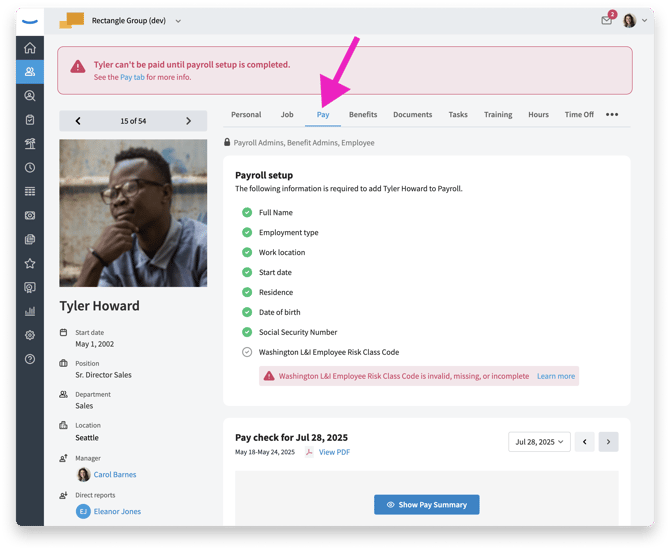
On the employee’s profile, click the Pay tab. You’ll see the Payroll setup checklist and the Other Payroll-related Information card lower on the page.
Step 2: Open the SOC code field
-
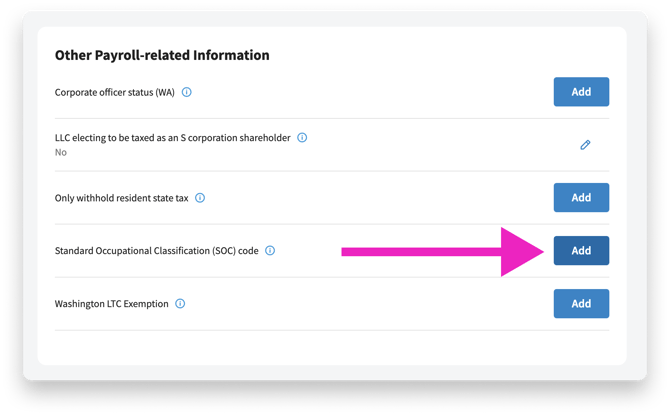
In the Other Payroll-related Information section, find Standard Occupational Classification (SOC) code.
-
Click Add (or click the edit icon if a code already exists) to open the SOC code dialog.