![cdccd4037784792b954880028bbf7390a34ca91e-2.png]](https://support.eddy.com/hs-fs/hubfs/cdccd4037784792b954880028bbf7390a34ca91e-2.png?height=40&name=cdccd4037784792b954880028bbf7390a34ca91e-2.png)
A Quick I-9 Refresher
Form I-9 is the federal Employment Eligibility Verification form required by USCIS for every employee hired in the United States. It confirms that a new hire is authorized to work. Section 1 is completed by the employee on or before their first day of work. Section 2 is completed by an authorized employer representative (the "second signer") within three business days of the employee's first day, after physically examining the employee's identity and work authorization documents.
Federal regulations require you to retain a completed Form I-9 for every employee for as long as they work for you, and for a certain period after employment ends. Failing to maintain accurate, complete I-9 records can result in significant fines during a government audit.
The Form I-9 Section in Eddy
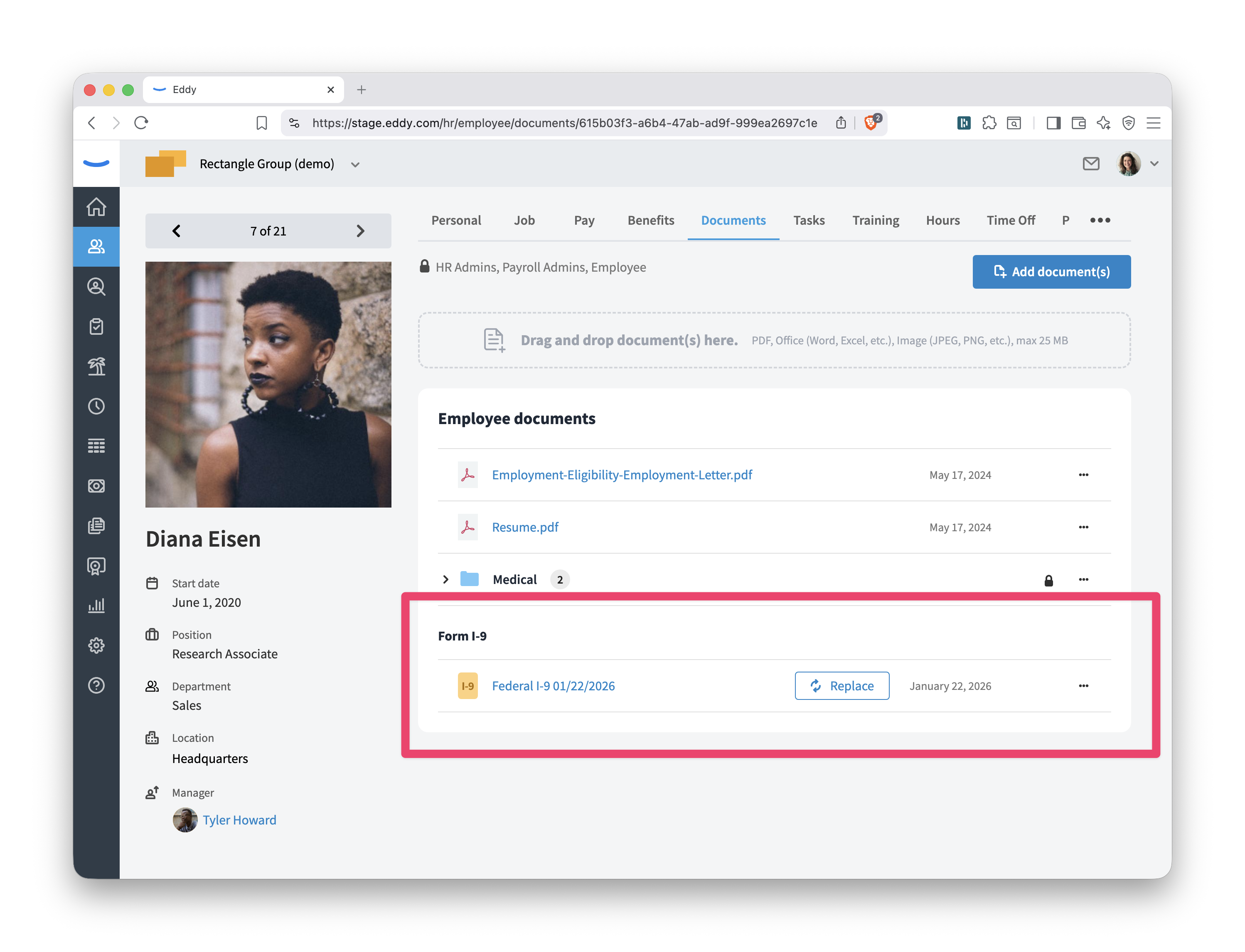
Eddy gives every employee profile a dedicated Form I-9 section inside the Documents tab. This keeps I-9 documents separate from general employee documents and makes it easy to find, manage, and audit them at any time.
Adding a Form I-9
HR Admins can add a Form I-9 to an employee's profile in two ways:
- Upload from computer — Use this if you have a paper or PDF copy of a completed I-9 that was signed outside of Eddy.
- Select from employee documents — Designate an existing document already on the employee's profile as the Form I-9.
Requesting a Form I-9 Completion Through Eddy
If the employee hasn't completed their I-9 yet, you can send it as a task directly from the Form I-9 section:
- Click the Request button in the Form I-9 section.
- Select the person who will serve as the second signer (the reviewer who will examine the employee's documents and complete Section 2).
- Set a due date and click Add task.
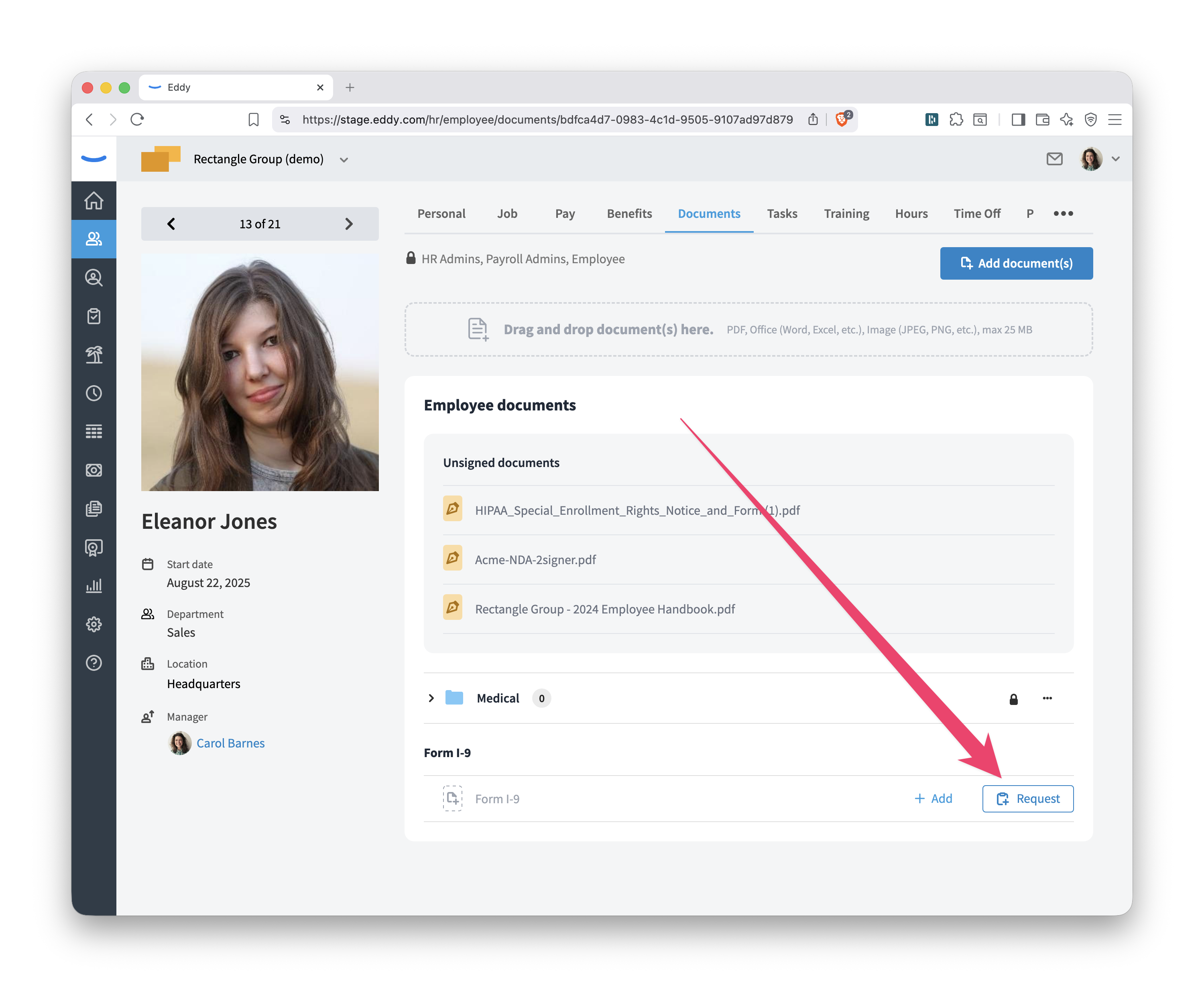
Once the task is created, the Form I-9 section will show a status of Awaiting employee until the employee completes Section 1, then Awaiting reviewer [Name] until the second signer completes Section 2. When both signers have completed their steps, the finalized PDF is automatically saved to the Form I-9 section.
Replacing a Form I-9
If you need to update the Form I-9 on file, click the Replace button. You can then select from employee documents, upload from your computer, or request a new completion task. The previous version is not deleted; it moves to the document history.
Running an Internal I-9 Audit
Eddy's Form I-9 Audit report is the best place to start an internal audit. It gives you a company-wide view of every employee's I-9 status and the documents recorded by the second signer in Section 2.
How to Use the Audit Report
Navigate to Reports and open the Form I-9 Audit Trail report. The report includes:
- Employee name, hire date, and employment status
- I-9 completion status (missing, pending, complete)
- List A, List B, and List C column groups, each showing the document name and expiration date recorded in Section 2
Use this report to quickly identify:
- Employees with no Form I-9 on file — these are the most urgent compliance gaps to address.
- Employees with expiring documents — scan the expiration date columns to find documents coming up for reverification.
Note on reverification: Not all expiring documents require reverification. U.S. passports, U.S. passport cards, Permanent Resident Cards (Green Cards), List B documents, and documents belonging to U.S. citizens or noncitizen nationals are never subject to reverification. List C documents and certain other work authorization documents may require it. When in doubt, consult the USCIS Handbook for Employers (M-274).
Reviewing Individual I-9 History
For any employee, you can click into their Form I-9 section and use the three-dot menu (⋯) to select History. The history dialog shows every I-9 document that has ever been on file for that employee, along with a timeline of events: who completed each section, when it was signed, and any Supplement B completions.
Completing Supplement B (Reverification, Rehire, and Name Changes)
USCIS requires employers to update a previously completed Form I-9 — rather than creating a new one — in three situations:
- Reverification — An employee's work authorization document has expired and they need to present new documentation.
- Rehire — An employee is rehired within three years of the date their original Form I-9 was completed.
- Name change — An employee has a legal name change.
How to Complete Supplement B in Eddy
- Go to the employee's Documents tab and find the Form I-9 section.
- Click the three-dot menu (⋯) and select Complete Supplement B.
- Choose the Purpose from the dropdown: Reverification, Rehire, or Name Change.
- Fill in the relevant fields:
- Reverification: Enter the new document title, number, and expiration date (if any). You can also note a simultaneous name change.
- Rehire: Enter the date of rehire. If the employee's work authorization has also expired, enter the new document information as well.
- Name Change: Enter the employee's new last name, first name, and/or middle initial. Note that updating Supplement B does not automatically update the employee's name in their Eddy profile — you'll need to do that separately.
- Click Next: Sign form and complete the reviewer signature.
Eddy will generate an updated Form I-9 PDF with Supplement B completed and save it back to the Form I-9 section. The history will record the Supplement B signing event. Supplement B can be completed up to three times on the same form; if additional space is needed, Eddy will attach a continuation page.
Tip: If you want to assign the Supplement B completion to another person (such as a site manager), you can create a task for them from the Form I-9 section instead of completing it yourself.
Tips for Staying on Top of Compliance
- Run the audit report on a recurring schedule. Pull the Form I-9 Audit Trail monthly or quarterly and sort by the document expiration date columns to catch upcoming reverification needs before they become violations.
- Use Eddy tasks for new hires. Build the Form I-9 request into your onboarding workflow so no new hire slips through without a completed I-9.
- Check the history before replacing a document. Before uploading a corrected or updated I-9, use the History dialog to understand what's already on record. This helps you avoid accidentally overwriting a document you meant to keep.
- Address gaps promptly. If the audit report shows an employee missing an I-9, use the Add or Request buttons on their profile to resolve it right away. Document your good-faith effort to correct the record.
- Know your retention rules. You are required to retain Form I-9 for the later of: three years after the date of hire, or one year after the date employment ends. The document history in Eddy helps you maintain that record even after an employee is terminated.