![cdccd4037784792b954880028bbf7390a34ca91e-2.png]](https://support.eddy.com/hs-fs/hubfs/cdccd4037784792b954880028bbf7390a34ca91e-2.png?height=40&name=cdccd4037784792b954880028bbf7390a34ca91e-2.png)
Select the Termination Payroll Option During Offboarding
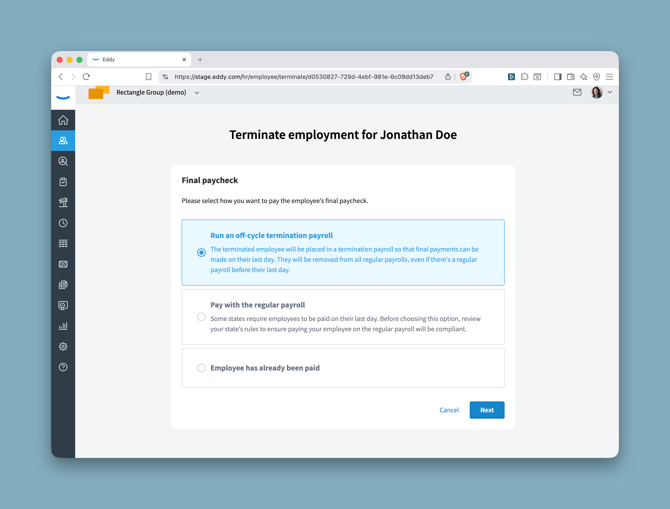
When terminating an person's employment, you will reach the Final Paycheck step in the termination flow. (For more information on terminating an employee in Eddy, see How to Terminate an Employee.) You'll be presented with three options:
- Run an off-cycle termination payroll — The terminated employee will be placed in a termination payroll so that final payments can be made on their last day. They will be removed from all regular payrolls, even if there's a regular payroll before their last day.
- Pay with the regular payroll — Some states require employees to be paid on their last day. Before choosing this option, review your state's rules to ensure paying your employee on the regular payroll will be compliant.
- Employee has already been paid — Select this if the final paycheck has already been issued outside of Eddy.
Note: The Final Paycheck step only appears if your company has Eddy Payroll enabled. If you do not use Eddy Payroll, this step is skipped.
Select Run an off-cycle termination payroll and click Next to continue.
Complete the Termination Flow
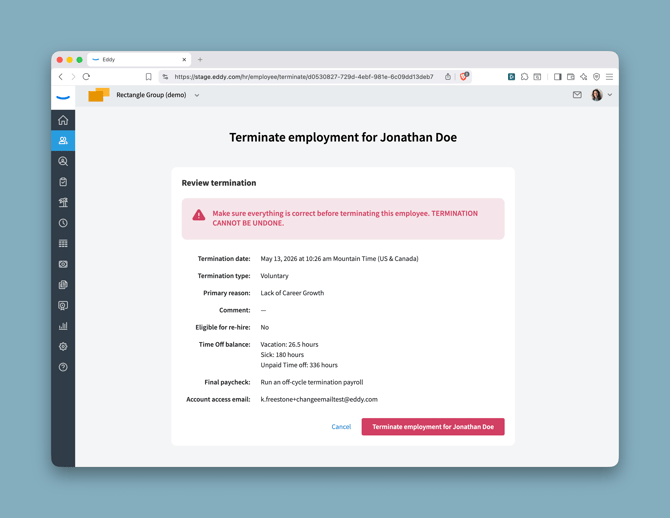
Finish the remaining steps of the termination flow (Time Off Balances, Account Email, Reassignments, and the final Review screen). Once you confirm the termination, Eddy will generate the Special Payroll for Terminated Employees card in the Payroll tab.
Run the Termination Payroll
To run the termination payroll, Navigate to the Payroll tab. Look for the payroll card that is labeled Other (rather than your normal pay schedule title). This card appears after the employee's last day of work.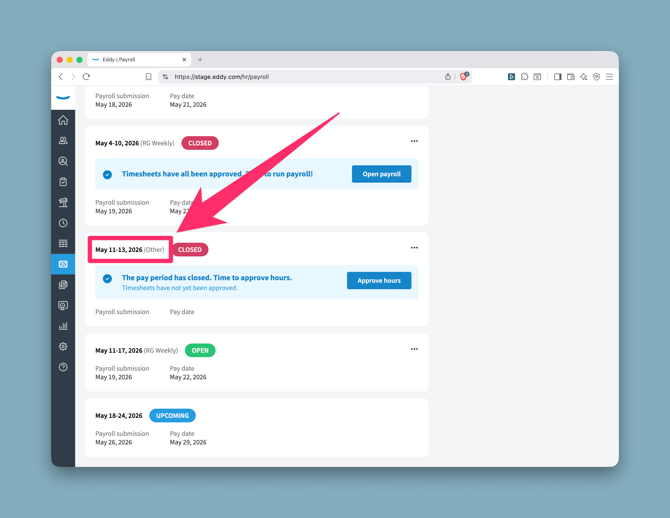
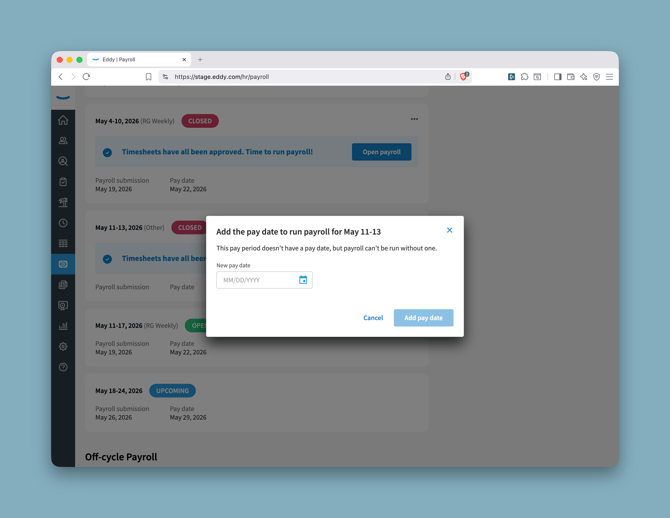
Once the hours are approved, click Run payroll. A prompt will appear asking you to add a pay date — this pay period doesn't have one yet, and payroll can't be run without it. Enter the date and click Add pay date to proceed.
What to expect in the payroll run
- Payment method: The termination payroll will use whatever payment method the employee already has on file — either direct deposit or paper check. If the final paycheck needs to be delivered immediately, we recommend switching to paper check during the payroll run so you can hand-deliver it to the employee on their last day.
- Timesheet approval: If the terminated employee tracked time using timesheets, Eddy will prompt you to complete a timesheet approval flow so any outstanding hours are captured before the payroll is finalized.
- PTO balance alert: If the employee has an outstanding PTO balance, Eddy will surface an alert reminding you to account for any payout required by your state.
- Benefits proration reminder: You may need to prorate any benefit amounts that apply to the employee's final pay period.
Tip: Some states have strict requirements about when a final paycheck must be issued. Refer to your state's final paycheck laws when choosing this date. All terminated employees assigned the same pay date will be grouped into a single payroll run.
Grouping Multiple Terminated Employees
If you have terminated multiple employees and selected the same pay date for each, they will all appear in the same termination payroll run. This makes it easy to process final paychecks for several employees at once without running separate payrolls.
Frequently Asked Questions
What if I chose "Pay with the regular payroll" instead? The Special Payroll for Terminated Employees card will not appear. The employee will remain in your normal payroll schedule and be paid on the next regular pay date.
Can I switch from regular payroll to a termination payroll after the fact? You can run an off-cycle payroll at any time to handle employee termination.
How do I calculate the correct pay for a salaried employee's termination payroll? Because a termination pay period is typically shorter than a standard pay period, Eddy does not automatically calculate the correct salary amount for salaried employees. You will need to manually calculate and enter their earnings based on the number of hours or days they worked during the pay period.
To calculate prorated salary:
- Determine the employee's regular salary for the full pay period.
- Divide that amount by the total number of working days (or hours) in the standard pay period.
- Multiply by the number of days (or hours) the employee actually worked before their termination date.
- Enter the resulting amount manually in the termination payroll.
For example, if an employee earns $4,000 per semi-monthly pay period (based on ~86.67 hours), and they worked 10 days out of a standard 10-business-day period, they would receive their full $4,000. If they only worked 6 of those 10 days, their prorated pay would be $4,000 × (6/10) = $2,400. Learn more about how Eddy handles Salary proration in payroll.
Will the terminated employee still appear in my regular payroll run? No. When you select the off-cycle termination payroll option, the employee is removed from all regular payrolls — even if a regular payroll is scheduled before their last day. Their final payment will be handled exclusively through the termination payroll run.